How to Get Your JAMB Profile Code for 2026: Official SMS & USSD Methods (With Troubleshooting Guide)
Navigating the labyrinth of university admissions in Nigeria starts with one indispensable cryptographic key: your profile code. The Joint Admissions and Matriculation Board (JAMB) has fortified its verification protocols for the 2026 UTME and Direct Entry exercises, making precision mandatory. One misplaced digit or overlooked prerequisite can completely derail your academic timeline.
Here is the exact blueprint to generate your code smoothly, sidestep catastrophic network errors, and secure your examination slot.
What Is a JAMB Profile Code and Why Do You Need It for 2026?
The JAMB profile code is a unique, mandatory 10-digit number that permanently links your National Identification Number (NIN) to the Joint Admissions and Matriculation Board database. Without this specific identifier, you absolutely cannot purchase your 2026 e-PIN, register at a CBT center, or process university admissions.
Think of it as your overarching digital passport. It acts as the immutable bridge between your biographical data stored with the government and your academic standing. You will use it continually—from the moment you initiate e-PIN vending to the day you print your final admission letter.
What Are the Mandatory Requirements Before Generating Your 2026 Code?
Before initiating the process, you must possess a verified 11-digit National Identification Number (NIN) correctly linked to your personal data. Additionally, you need a personal, active SIM card not previously used for another candidate’s registration, and a minimum of ₦50 airtime in your primary account balance.
To ensure absolute readiness, audit your materials against this checklist:
-
A Valid NIN: Memorize or copy your 11-digit number directly from your NIMC slip.
-
Exclusive Cellular Ownership: Borrowing a sibling’s phone line is algorithmic suicide. JAMB strictly enforces a “One Candidate, One SIM” policy.
-
Sufficient Primary Airtime: Ensure your network provider has not sequestered your ₦50 into a specialized tariff wallet.
How Can I Get My JAMB Profile Code via SMS?
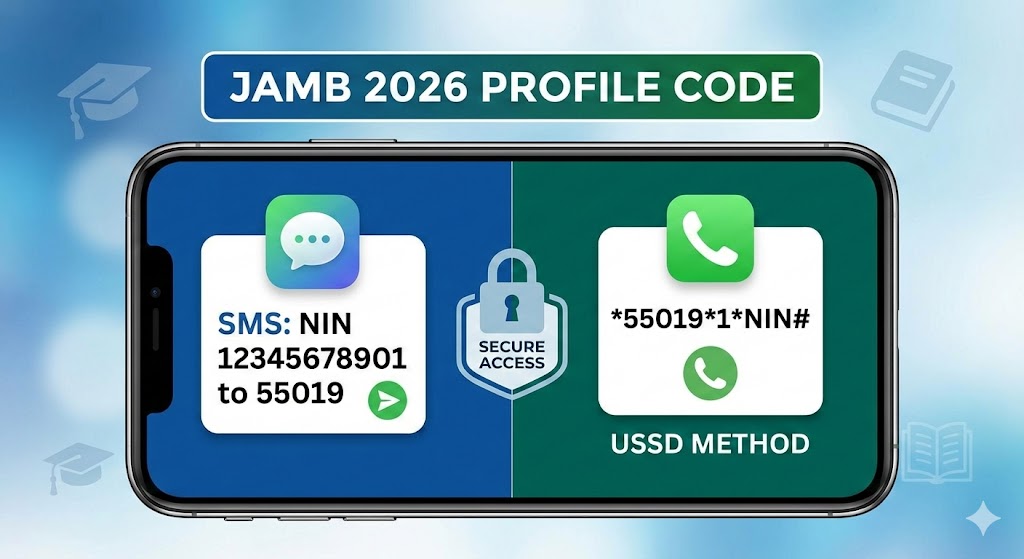
To generate your code via text, open your messaging application and type the word NIN, followed by a single space, and then your 11-digit National Identification Number. Send this exact alphanumeric sequence to either 55019 or 66019. Your 10-digit profile code will arrive momentarily via return message.
This remains the most heavily utilized pathway. Follow these precise mechanics:
-
Launch your smartphone’s native SMS application.
-
Type NIN (all capital letters).
-
Tap the spacebar exactly once.
-
Input your 11-digit NIN (e.g.,
NIN 87654321098). -
Set the recipient to 55019 (or the secondary gateway, 66019).
-
Hit send and await the confirmation text containing your name and the 10-digit code.
How Do I Generate the JAMB Profile Code via USSD?
If the standard messaging route fails due to network congestion, utilize the official USSD alternative. Dial *55019*1* followed by your 11-digit NIN and the hash symbol (#), or use the backup dial code *66019*1*NIN#. Press send to immediately display your 10-digit profile code on the screen.
USSD commands cut through telecom bottlenecks rapidly.
-
Open your phone’s dialer pad.
-
Input
*55019*1*or*66019*1*. -
Append your NIN directly without any spaces.
-
Cap it off with the
#symbol. -
Execute the call.
The system will flash your code directly via a pop-up prompt. Screenshot it immediately.
How Can I Retrieve a Lost JAMB Profile Code?
If you misplace your previously generated code, there is no need to create a new one. Simply open your messaging app and send the word RESEND to either 55019 or 66019 using the original phone number. The system will instantly retrieve and redeliver your permanent 10-character code.
Panic usually sets in when a device gets wiped or a notebook goes missing. Breathe. Because the code is inextricably tied to your specific SIM card, retrieval is frictionless. Just ensure you still have network coverage and the requisite airtime fee.
What Are the Most Common Profile Code Errors and Their Solutions?
Candidates frequently encounter automated rejection messages like “No Record Found” or “Wrong Parameter.” These system barriers usually stem from unverified NIMC data, incorrect SMS formatting, or utilizing a SIM card linked to a previous candidate. Resolving these bottlenecks requires immediate data validation or strict adherence to formatting syntax.
Refer to this diagnostic matrix if your request bounces:
| Error Message | Underlying Root Cause | Immediate Corrective Action |
| “No Record Found” | The NIMC database cannot validate your NIN. | Visit an NIMC office physically for biometric validation. Do not spam the SMS gateway. |
| “Wrong Parameter” | Incorrect spacing, hyphens, or character syntax. | Ensure the format is flawlessly typed as NIN 12345678901 with just one space. |
| “Number Already Registered” | The SIM card was previously used for a JAMB profile. | Procure a fresh, unregistered SIM card immediately. |
The “Keep My Number” (KMN) Strategy: How Do I Protect My JAMB SIM?
JAMB permanently binds your entire academic trajectory to the specific phone number used during profile generation. To prevent telecommunication providers from reassigning your dormant line, immediately activate the Keep My Number (KMN) protocol offered by your network, which guarantees cellular ownership retention for up to three years.
Most candidates abandon their SIM cards after securing admission, only to discover they cannot access their portals for post-UTME screening or NYSC mobilization years later because the network recycled their inactive number. Engaging your provider’s KMN service is an elite defensive tactic that secures your profile indefinitely.
Why Must I Audit My NIMC Data Before Generating the Code?
The exact microsecond your generation request hits the 55019 server, your biometric and biographical data from the NIMC database becomes permanently locked into the JAMB portal. You must audit your NIMC mobile application beforehand; correcting a misspelled name post-generation involves grueling bureaucratic hurdles and administrative fees.
Never assume your government records are flawless. A misspelled surname or an inverted birth year currently resting in the NIMC registry will clone itself directly onto your JAMB examination slip. Pre-generation auditing is your only safeguard against identity mismatches at the CBT center.
Bonus Airtime vs. Main Balance: Which Does JAMB Accept?
A pervasive technical pitfall occurs when candidates attempt the USSD or SMS prompt using promotional network bonuses. The ₦50 telecommunications gateway charge must be deducted exclusively from your main account balance. Tariff plan bonuses, data allowances, or promotional credits will trigger an automatic gateway timeout and failure.
Network providers route premium shortcode services differently than standard texts. If you recharge your line and the funds immediately divert to a “Weekend Bonus” or “Awuf” account, the 55019 server will read your balance as zero. Always specify to your vendor that you require a direct, primary balance top-up.